
# 7 most common smart home design mistakes
Most costly smart home mistakes happen not when choosing devices, but at the electrical design stage - or earlier, when agreeing the scope of work with the electrician. Some are fixable at the cost of a partial renovation. A few are irreversible.
# Mistake 1: Deciding on automation after plastering and floor screeding
The latest point at which you can sensibly plan a smart home installation is before walls and floors are closed. Electrical wiring must be run while chases and conduits are still accessible.
Investors who decide after finishing can only automate what is already wired to the distribution board. New star-topology circuits cannot be added without breaking into walls. In practice this means giving up independent control of individual light points, in-wall sensors, and control cables to blind actuators.
Question for your electrician at the design stage: What is the latest point at which changes to the electrical design can be made for building automation?
# Mistake 2: No star-topology wiring
In a traditional electrical installation, the switch is wired in series with the circuit: the supply cable runs from the distribution board to the switch, then from the switch to the lamp. This loop topology is not suitable for automation because it does not allow individual points to be controlled independently from the board.
In an installation designed for automation, every light point and every load must have its own cable running directly from the distribution board (star topology). The wall switch becomes a digital input of a module, not part of the supply circuit. Each output's function is then defined in software, without touching the cables.
If the electrician proposes conventional loop wiring, the result is the ability to switch groups of circuits from one output - but not individual lamps, blinds, or loads independently.
Question for your electrician: Will the lighting wiring follow star topology from the distribution board to each point, with a separate cable to each load?
# Mistake 3: Undersized distribution board, no DIN rail reserve
Building automation modules mount on a DIN rail in the distribution board alongside the protective devices. Each module occupies a set number of module units (MU). Investors who do not account for this end up with a board that is full after the first installation.
The consequence is straightforward: expanding the system later requires either replacing the board with a larger one (rewiring, labour cost) or installing a separate automation enclosure, which complicates the bus cabling and takes additional wall space.
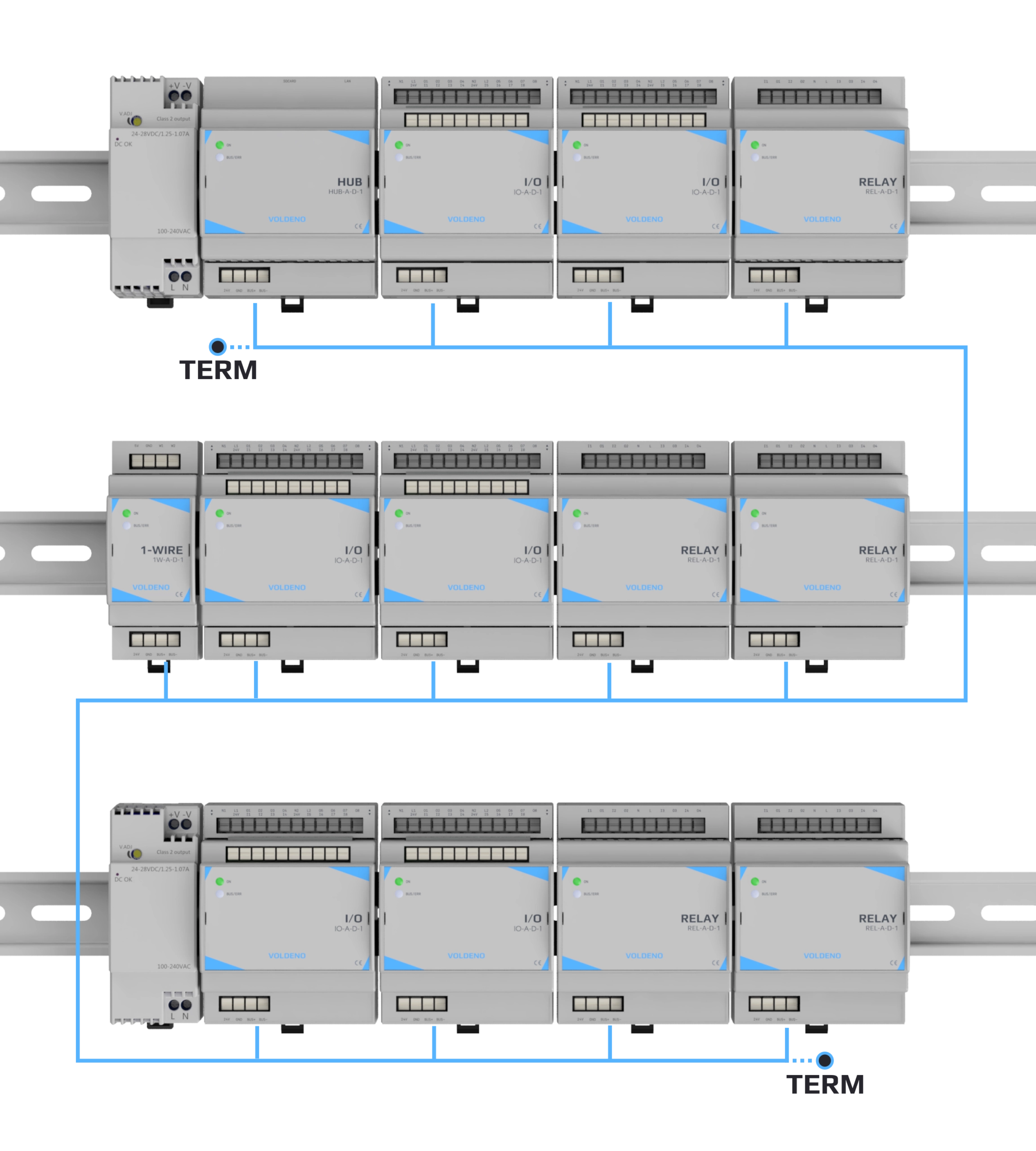
A practical rule: plan at least 30-50% free DIN rail space beyond your current requirement. A typical Voldeno installation for a ~120 m² house uses 9-15 modules (Hub, I/O, Relay, 1-Wire, Analog Input depending on circuit count), but expanding for solar PV, garden irrigation, or additional heating zones requires more.
Question for your electrician: How many free module units will remain on the DIN rail after fitting the protective devices and the planned automation modules?
# Mistake 4: Choosing a closed ecosystem with no custom logic
Many building automation platforms offer ready-made logic blocks: scenes, schedules, conditions based on sensor states. That covers typical scenarios. The problem appears when an installation requires something outside the vendor's catalogue: multi-zone control with weather conditions, integration with a non-standard device via a custom protocol, parallel automations with priorities.
On closed platforms with no custom logic capability, the installer must either assemble a complex scenario from dozens of ready-made blocks (if it is even possible), or drop the requirement. The investor ends up with a system that does exactly what the manufacturer chose to implement - no more.
In Voldeno, ready-made logic blocks in Studio handle typical scenarios without writing code. For complex integrations and custom scenarios, installers and integrators write their own blocks in Volang - without constraints on logic complexity. Both levels share the same runtime environment running in the modules.
Question for your system vendor: Does the platform allow writing custom logic blocks or scripts without a developer licence or partner agreement?
# Mistake 5: No conduits or cable reserve to future zones
The control bus must reach every location where automation modules are planned: garage, boiler room, upstairs enclosure, garden shed. The bus cable is run alongside the electrical installation before walls are closed.
Investors who plan automation "just for the house for now" often do not extend the bus to the garage or an external enclosure. When the need for automatic garden lighting, a gate drive, or irrigation appears a few years later, the bus cable has to be routed through finished walls or external cladding.
The cheaper solution is to extend the bus (or at least a protective conduit) to planned future locations during construction, even without mounting modules there immediately. Bus length limits and termination requirements are described in Bus topology and wiring.
Question for your electrician: Is the control bus route planned to the garage, boiler room, and garden, even if we are not mounting modules there yet?
# Mistake 6: Planning only lighting instead of the full building installation
Lighting automation is the most common starting point, but implementing it in isolation from heating, alarm, and blinds almost guarantees that in a few years the investor will have several independent systems with no way to communicate with each other.
Alarm panel standalone, heating controller standalone, lighting automation standalone. Each system operates in its own silo: the alarm cannot switch on lights when a sensor triggers, heating does not know a window is open, blinds do not respond to the alarm state.
Before deciding on scope, list all the installation systems in the building and check which ones have communication interfaces (TCP, HTTP, Modbus) that allow integration. Then decide which scenarios should run automatically across systems. That scope defines the minimum integration project.
Question for your integrator: Which of the planned systems (alarm, heating, solar PV, gates) have communication interfaces and can be covered by a single automation project?
# Mistake 7: No as-built documentation for the automation project
In many installations the automation project exists only in a tool on the installer's laptop. No export, no copy with the investor, no module address list. When the installer is no longer available, the building owner cannot expand, service, or hand over the installation to another contractor.
In Voldeno the full project configuration is stored on the Hub module: it can be read and edited directly through Voldeno Studio without involving the original installer. That does not eliminate the need for documentation, but it guarantees the owner is not technically dependent on an external archive.
Before sign-off, request from the installer: a project export from Voldeno Studio, a description of module addresses and functions, and a short user guide for the household (zones, physical switches, behaviour after a power cut).
Question for your installer before sign-off: Does the as-built documentation include a configuration project export, module address list, and a user guide?
# Questions and answers
What is the latest point at which you can plan a smart home in a new build? Before chases and cable conduits are closed - that means before plastering and floor screeding. At the "closed shell" stage new cables can still be run. After finishing, automation scope is limited to circuits already in the distribution board.
Can automation be installed in an existing house without renovation? To a limited extent. Circuits wired to the distribution board can be automated without touching the wiring. Full independent control of individual light points requires star topology. The Hub's HTTP and TCP integrations can connect any network-enabled device (boiler controller, alarm panel, inverter) in any installation without new cables.
How large a distribution board should you plan for automation? Count the modules you need today (Hub plus I/O, Relay, 1-Wire, Analog Input based on circuit count) and add 30-50% reserve. Detailed module breakdowns for three building sizes are in How much does a smart home cost?.
Does star-topology wiring significantly increase the cost of the electrical installation? It requires more metres of cable, since each load has its own run back to the board instead of a shared loop. In new construction the material cost difference is small relative to the total build cost. In a renovation with wall access it is a one-time outlay that eliminates the need to break into walls for every future change in automation scope.
What if the electrical installation is already wired in loop topology? Automation scope is limited to switching groups of circuits from the board. Independent control of each point is not possible without rewiring. In that situation the Hub's network integrations can still connect systems with IP interfaces (boiler controller, alarm, inverter).
How do you verify that a system supports custom logic? Ask directly: does the platform support custom scripts or logic blocks without licence requirements? Is the development environment available free of charge? In Voldeno, Voldeno Studio is free and available on the Downloads page.
# Pre-design checklist
Before meeting your electrician or electrical designer, have answers ready for:
- Which circuits must be controlled independently (not as a group)?
- Where will the distribution boards be located and how much space is allocated for automation modules?
- Which rooms and outdoor zones must the control bus reach?
- Which systems (alarm, heating, PV, gates) are to be integrated in a single automation project?
- Who is responsible for the as-built documentation and configuration project export?
For detailed system selection criteria, see How to choose a smart home system?. For hardware cost estimates by building size, see How much does a smart home cost?.
Planning a smart home? Leave your email
We will help match modules to your project or point you to a certified installer.