
# How to choose a smart home system: a practical guide
Choosing a home automation system is a long-term decision. It affects not just the convenience of daily control, but above all the stability of the installation, room for expansion, and maintenance costs over the years.
This guide is not a brand comparison or a product ranking. It is a list of questions worth answering before signing a contract with an installer or buying the first components. At each criterion we show how it maps to the Voldeno architecture: a CAN-FD wired bus, DIN-rail modules in the distribution board, logic distributed across modules instead of a centralised controller, and a single toolset for both installer and end user.
# What makes a real smart home system
A smart home system is a coherent automation layer: one way to control circuits (lighting, heating, gates, pumps, blinds), one way to define scenes and schedules, and predictable communication between devices. It is not a set of independent Wi-Fi devices, each with its own application and its own update history.
Such collections may look cheaper at the outset, but their main limitation is not the number of apps. The core problem is that these systems cannot interact with each other: there is no way to automatically turn off a water heater during low PV output, link alarm sensors to emergency lighting, or monitor total energy consumption in one place. Each system is a closed island.
Before comparing prices, clarify what should be smart: user comfort (scenes, scheduled lighting), energy savings (heating control with metering), security (alarm panel integration, notifications), or full automation of the building's electrical installation. The answer determines the project scope - from a few modules in an existing distribution board to a system spanning multiple enclosures and building zones.
# Wired or wireless
Wireless systems based on Wi-Fi or dedicated radio protocols are quick to commission and do not require changes to the electrical installation. Their limitation is connection reliability: dense wireless networks in neighbouring buildings, metal elements in the facade, or thick reinforced concrete walls affect signal quality and can cause unexpected communication failures.
For applications where consistency and predictable response time matter - controlling circuits from the distribution board, heating pumps, valves, multi-zone lighting - wired solutions are the standard choice in professional installations. They require planning cable routes in advance and space for DIN-rail modules in the enclosure. In new construction or renovation involving electrical rewiring, this is a one-time investment that pays back in stability over the lifetime of the installation.
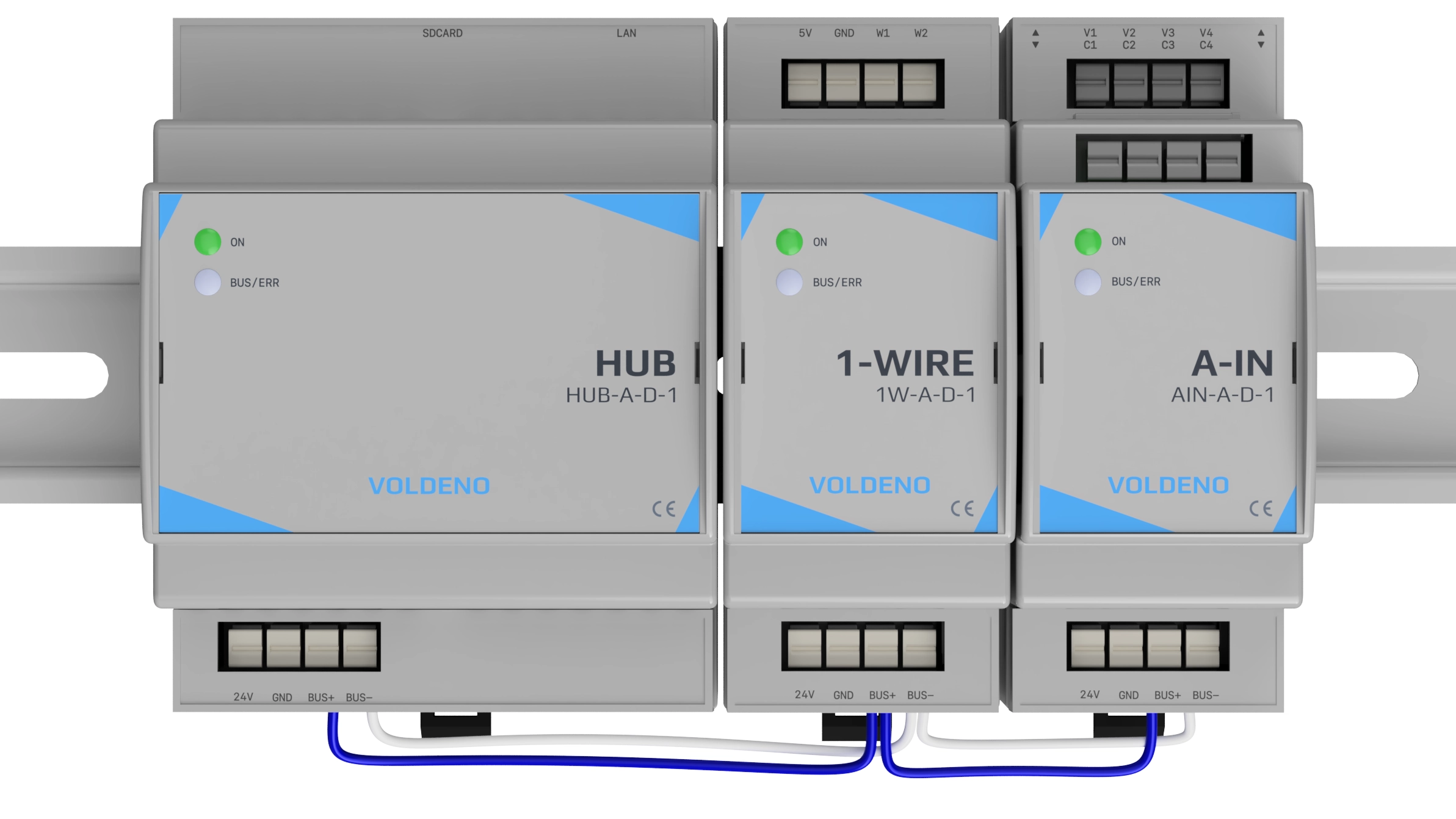
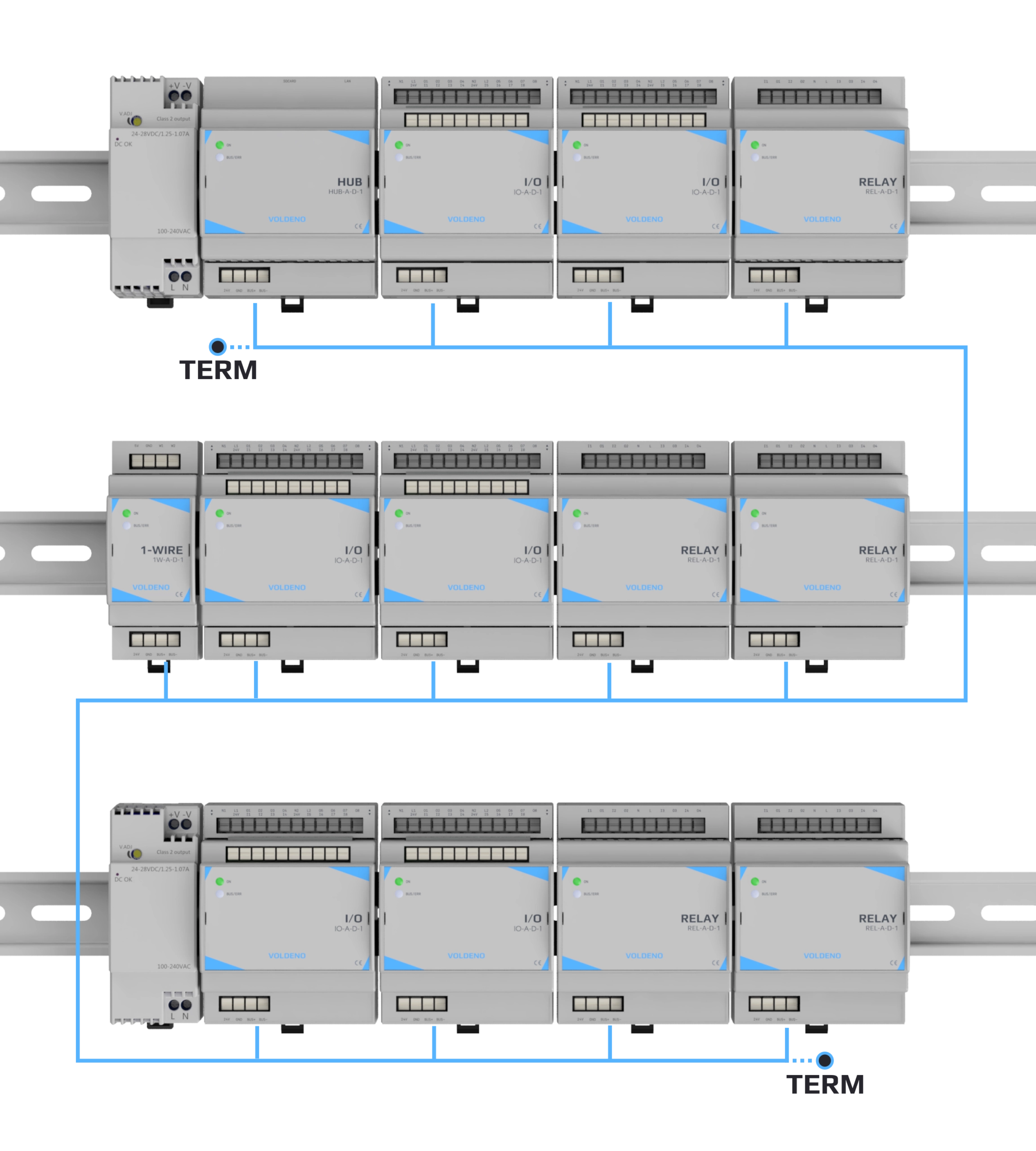
In Voldeno, automation modules are mounted on a DIN rail in the electrical distribution board. They are connected by the Voldeno Bus - a control bus based on CAN-FD running at 24 V DC - which runs between distribution boards or automation enclosures. Wiring from modules to actuators and sensors (switches, motion detectors, valve actuators, temperature sensors) uses standard installation cables - twisted pair or shielded cable depending on the application. Mains wiring (lighting circuits, sockets) is laid in a star topology from the distribution board to each point, giving full freedom to configure functions in software without changing any wiring. Bus topology, termination and length limits are described in Bus topology and wiring.
# Centralised logic or distributed control
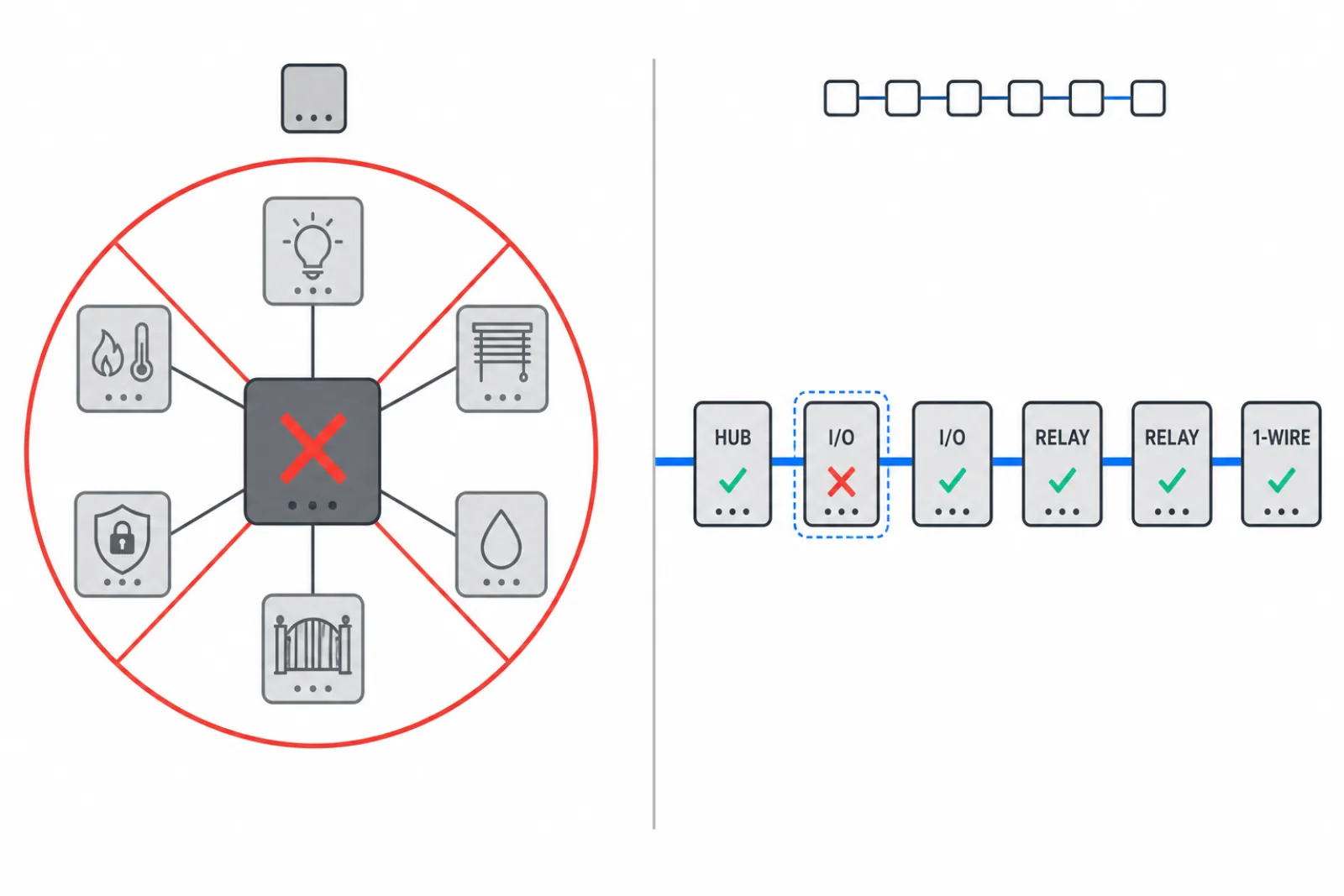
Many architectures concentrate all automation in a single central controller. Ease of configuration often comes with a trade-off: a failure of the central controller or its software can disable all automation functions at once. The alternative is an architecture where control logic runs directly in modules distributed along the bus, and the supervisory unit acts as a communication gateway, user interface, and service tool.
In Voldeno, some logic blocks can execute directly in expansion modules mounted in the distribution board. Not every automation scenario can be distributed this way, but the most critical functions - lighting, heating, blind control - can operate independently of the Hub's status or network connectivity. The Hub provides Ethernet connectivity, local storage of the project configuration, and remote access handling (details: System overview). In practical terms, a failure of one element affects a limited subset of functions rather than the whole installation.
The advanced layer is Volang - Voldeno's own programming language - together with the VolangVM runtime. This is the technology underlying the ready-made logic blocks: it enables their safe, parallel execution in a distributed module environment without a central script server. For installers and integrators, Volang makes it possible to build custom, dedicated logic blocks with no limit on scenario complexity. Language introduction: Volang language.
# One ecosystem or many independent systems
Look for a model where automation configuration and logic are in one environment, and daily control is in one predictable place - or directly at physical switches. In Voldeno, configuration and logic development are handled in Voldeno Studio (a desktop IDE, description: Voldeno Studio), while daily control and installation status are provided by Voldeno Mobile. Two tools with clearly separate roles - one for the installer and integrator, one for the end user.
This structure enables what cannot be achieved by connecting independent systems: lighting that responds to alarm state, heating that factors in PV data, automatic load shedding when a power threshold is exceeded - all within a single configuration project.
# Modularity: add an expansion module, not a new system
A build plan rarely accounts for everything from the start. Solar panels come a few years later, garden irrigation the next season, an additional heating zone after a floor is fitted out. In systems with a fixed channel count, expansion means replacing the entire controller or installing a second, parallel system.
The modular approach works differently: the bus and software stay unchanged, and expansion modules are added to the DIN rail - additional relay outputs, analogue inputs, 1-Wire temperature sensor support, and in the future modules for new interface types. The prerequisite is planning space in the distribution board from the beginning: sufficient DIN rail width, room for bus branch connections, and correct power supply (details: Power supply selection).
Full overview of available modules and their dimensions: Products.
# Integration with external devices
Many systems are priced attractively at the start, and the real cost appears with the first integration attempt - an alarm panel, a PV inverter, or a boiler controller. The typical outcome is a requirement for a separate integration gateway, a protocol licence, or an additional DIN-rail enclosure.
The Hub in Voldeno handles integrations requiring HTTP, TCP, and UDP communication directly within the automation project - without an additional module dedicated solely to network communication. Typical applications include receiving events from an alarm panel over TCP or polling a device that exposes data via a REST API. It is worth distinguishing IP network communication from industrial fieldbus protocols: Modbus RTU/TCP is a separate standard with a register map and real-time cyclic operation - its support may require a dedicated module. The Hub handles network integrations; it does not replace hardware fieldbus interfaces.
# Module footprint and space in the distribution board
In some systems, every bus segment requires a dedicated bus power module mounted on the DIN rail. Such a module performs no control logic - it only supplies power to that bus segment. In Voldeno, bus connectivity between modules is provided by daisy-chain connectors integrated into each module: four channels (power, two data lines, ground) with a separate input and output on each module. The bus is wired from module to module with a short cable and no additional intermediate components (details: System overview).
Voldeno modules have a width compatible with standard DIN-rail installation devices - without protruding field connectors that in some systems require deep enclosures dedicated to automation. In practice, automation modules can share a standard distribution board with protective devices, without a separate cabinet.
# Current measurement on relay outputs
Energy monitoring often requires separate energy meters or measurement modules integrated with the system, with all the implications for enclosure space, wiring, and configuration.
The RELAY and I/O modules measure current on every relay channel. This makes it possible to monitor the actual load of a circuit, detect anomalies (no current on an active output may indicate a blown lamp or an open circuit), and collect energy consumption data without separate meters on every circuit.
# Connections: push-in terminals instead of screws
In an electrical distribution board, cyclic temperature changes and load variations can loosen screw connections. An under-tightened screw terminal is a real risk of overheating and short circuit. Push-in (spring-clamp) terminals maintain constant contact pressure regardless of thermal cycling and do not require periodic inspection and re-tightening.
# Hardware protection and operating temperature range
Several properties distinguish modules designed for permanent installation from consumer-grade devices: reverse polarity protection, overvoltage protection, bus short-circuit detection (particularly relevant for the 1-Wire bus), and a suitable operating temperature range under heavy relay channel loading.
None of these properties replaces correct overcurrent protection selection and compliance with wiring instructions, but they limit the consequences of typical installation errors and support reliable module operation over the long term.
# Configuration: accessible for the owner, scalable for the integrator
A system that requires an installer visit every time a lighting schedule changes quickly generates hidden operating costs. On the other hand, consumer-grade platforms often cannot handle complex scenarios, multiple parallel automations, or integrations with non-standard devices.
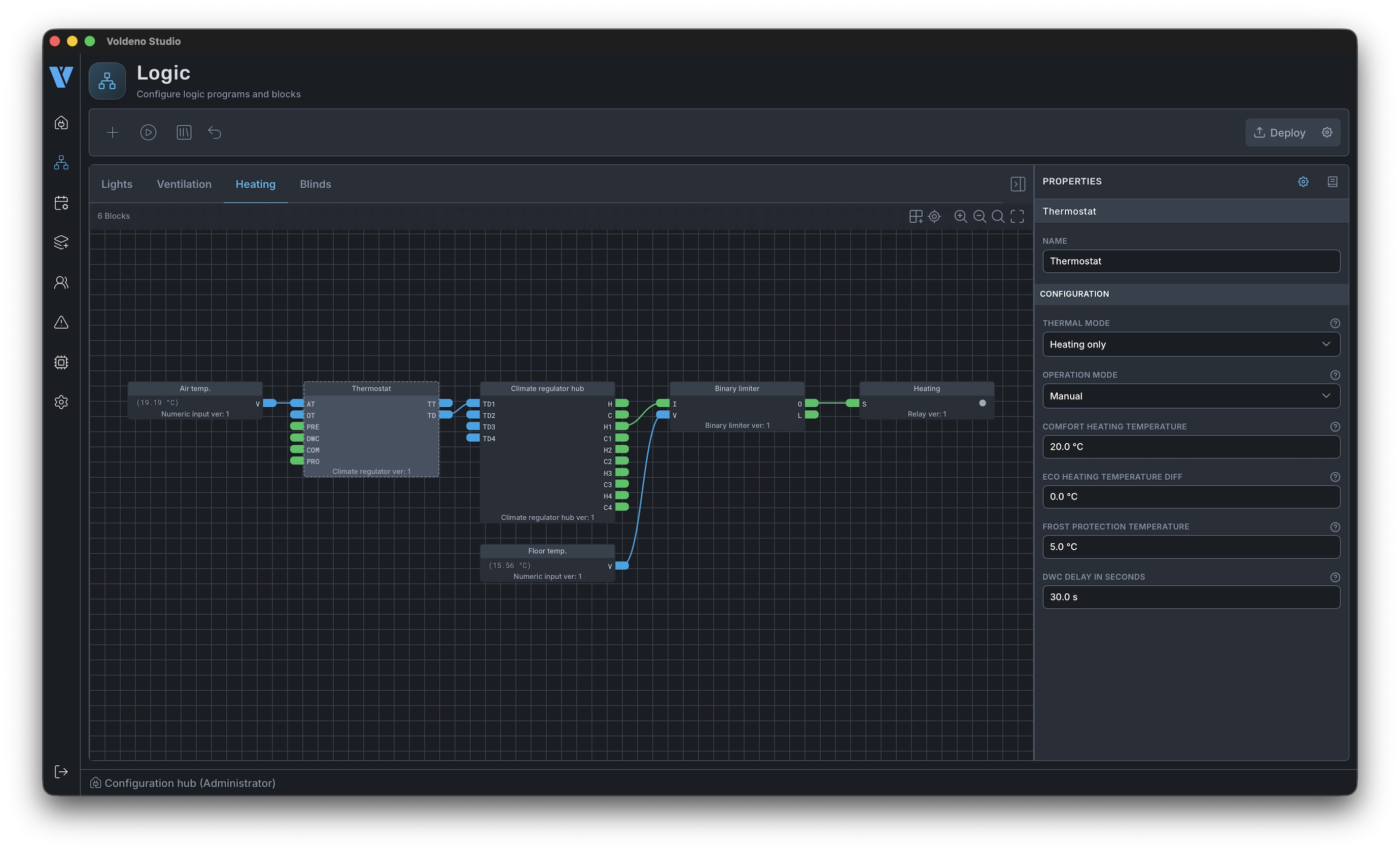
Voldeno Studio combines a graphical logic block environment - typical automation scenarios without writing code - with the full capabilities of the Volang language for integrators building custom solutions. New scenarios and configuration changes are deployed without updating module firmware for every logic change, which shortens service time and reduces the risk of errors during on-site updates. Download Studio: Downloads.
# Software updates and independence from the installer
Module firmware and tooling are part of the running cost, not just a one-time purchase. In Voldeno, firmware updates can be performed remotely without a service visit. Importantly, new logic blocks and feature extensions often do not require a firmware update - new logic is loaded into the project in Studio and runs on existing hardware.
Equally important is independence from the installer. In many systems, the automation project exists only on the installer's laptop. In Voldeno, the complete project configuration is stored on the Hub module - it is always available directly in the system, regardless of whether the installer has shared the latest copy. Voldeno Studio reads and edits the project directly from the Hub. This means the installation owner always has access to their control logic, without depending on an external contractor's archive.
# Local operation, privacy, and encryption
For many users, independence from the manufacturer's cloud is a deciding factor: automation should work even without internet access. Voldeno is designed so that control logic runs locally, and cloud services are an option - not a condition for the installation to function (see Basic concepts).
All communication in the system - including traffic on the local network - is encrypted using TLS. Data stored in device flash memory is encrypted. If you use Voldeno Cloud, no installation data is stored there permanently and there is no technical way for Voldeno personnel to read it. Data processing details: Privacy policy.
# Start with a defined scope
During the design phase, agree with the installer which circuits are included in the automation from the start (e.g. common area lighting, circulation pump, zone valves, temperature sensors) and which can be added in later stages. The one condition is that the bus must be designed from the beginning to accommodate the final number of nodes and total length.
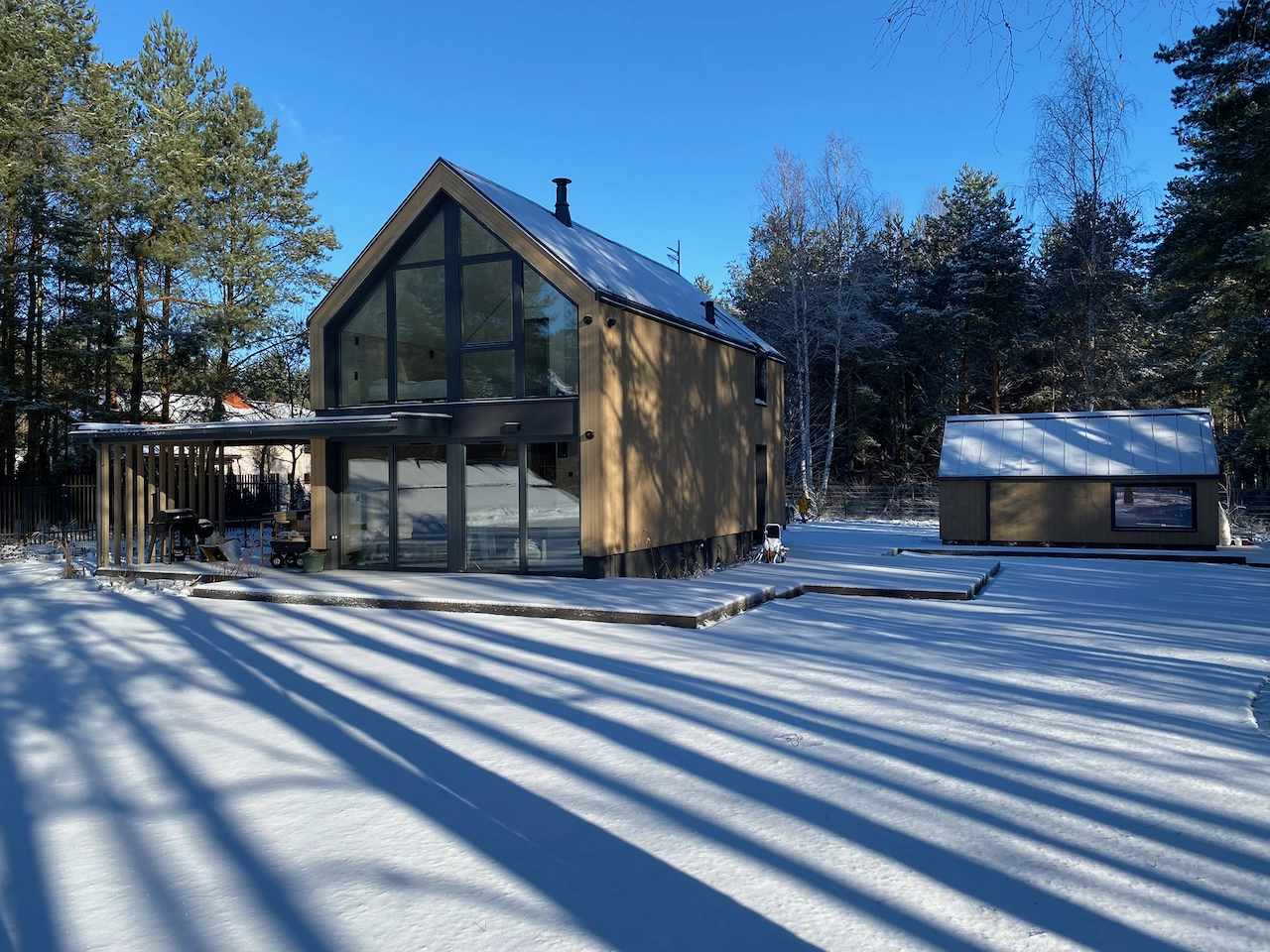
An example of an installation covering room automation, irrigation, and energy management: Modern barn.
# From concept to commissioning
At the concept stage, it is useful to separate three groups: functions the user will control manually, automations that run on schedules or sensor states, and circuits that will remain in standard electromechanical mode. The more precisely the scope is defined at the start, the more accurate the quote and the shorter the installation.
At the electrical design stage, the key questions are: location and number of distribution boards, available DIN rail space, bus route between enclosures, and planned branch points. Bus length limits and node count are described in Bus topology.
At the installation stage, the sequence is fixed: power supply and protective devices first, then automation modules, addressing and bus verification, and finally logic configuration in Studio. A good practice after commissioning is to prepare a brief installation description for the occupants - which zones are under automation, where the physical override switches are, and what happens after a power failure.
# Checklist before talking to an installer
Bring to the meeting a floor plan (even a rough sketch), a list of planned devices (pump, valves, boiler controller with information on available communication interfaces), and your requirements for remote access. Ask directly about scope of work and responsibility boundaries: what is covered by the electrician and what by the system integrator.
Ask about as-built documentation: a project export from Voldeno Studio, a module address description, and a user guide. This is the prerequisite for efficient service and future expansion.
# Who installs it and when does automation make sense
Installing a Voldeno system is not fundamentally more complex than a standard electrical installation - it requires a qualified electrician for distribution board work. Logic configuration in most cases comes down to mapping inputs and outputs in Voldeno Studio and arranging scenarios by drag and drop. Even advanced automations do not require writing code when the installer works with ready-made logic blocks.
Voldeno provides support and consultancy at every stage - from module selection and enclosure design through commissioning and configuration. For installation partners, start at For professionals or contact us directly at Contact. Installers interested in exploring the tools will find Studio at Downloads.
# Questions and answers
Does a smart home require a permanent internet connection?
Not in the Voldeno architecture. Local automation operates without external network access. An internet connection is required only for remote access from outside the building, software updates, and cloud service use.
Is a wired installation possible in an apartment?
Yes, if a renovation is planned with access to the electrical installation and distribution board. In apartments where wall work is not possible, the automation scope is limited - typically to circuits accessible from the existing distribution board without rerouting cables.
What about solar panels if they are not in the current plan?
The modular approach does not require buying everything upfront. When integration with an inverter is needed (e.g. via Modbus, once such a module is available), the appropriate expansion module is added without replacing the existing installation.
Can one system handle lighting, heating, and irrigation at the same time?
Yes, provided the platform supports the required signal types (digital outputs, analogue signals 0-10 V and 4-20 mA, 1-Wire temperature sensors) and IP integrations. Overview of integration options: FAQ.
Is a dedicated server or computer running 24/7 needed?
No. The Hub serves as a communication node with an Ethernet interface and local configuration storage, but automation logic is executed by the modules themselves. There is no need to maintain a separate general-purpose machine.
What happens when the property is sold?
A project saved in Voldeno Studio can be handed over to the new owner or a different integrator. This is a meaningful difference from systems where configuration is tied to a manufacturer account or stored in a non-exportable format.
Does automation make sense without a full renovation?
It depends primarily on the type of existing electrical installation. Full independent circuit control requires a star topology - each lighting point or load fed by a separate cable from the distribution board. If that wiring is already in place, automation modules can be added to the existing board without touching the cables. Even without any electrical rewiring, the Hub with HTTP and TCP integrations can connect alarm panels, heating controllers, and inverters - and build useful automations without laying a single additional cable. This is a limited installation, but one that already delivers real benefits.
# Key takeaways
- Choose between individual Wi-Fi devices and distribution-board automation - these are different product categories with different service lifespans.
- Separate systems are not just a multiple-app problem - they mean no cross-system integration between lighting, alarm, heating, and solar.
- Choose a modular architecture: the ability to add expansion modules rather than replace the entire control system.
- Check hidden costs: integration gateways, bus power modules, energy meters, enclosure depth requirements.
- Assess fault tolerance: what stops working when one element fails, and what continues to operate independently.
- Look at connection quality, load measurement, and hardware protection, not only the declared feature list.
- Make sure the platform supports network integrations (HTTP/TCP/UDP) without a separate communication module.
If you have your criteria defined and want to see what such an installation actually costs, check: How much does a smart home cost? Three Voldeno installation variants
Planning a smart home? Leave your email
We will help match modules to your project or point you to a certified installer.